
How To Change Gmail Address? For years, Google users were told a simple and frustrating rule: once you create a Gmail address, you are stuck with it forever. That meant an old, unprofessional, or outdated email address could follow you for life — even as your career, name, or business changed.
That rule has finally changed. Google has begun rolling out a new feature that allows users to change their Gmail address without creating a new account and without losing emails, files, or history. This guide explains exactly how it works, who can use it, and how to change your Gmail address safely.
Table of Contents
What Has Changed?
Previously, your Gmail address was permanent. If you wanted a new one, you had to create a new Google account and manually move everything. Now, Google allows some users to replace their primary Gmail address while keeping:
- The same Google account
- The same inbox and email history
- The same Drive, Photos, Calendar, and subscriptions
Your old Gmail address becomes an alias and continues to receive emails. This is not just a cosmetic change. It is a change to your digital identity across Google’s ecosystem.
Your Leadership Story Deserves the Spotlight
Get featured on TheAshNow — the editorial platform trusted by founders, CEOs & executives worldwide for Google visibility, LinkedIn authority & global recognition.
Apply for Featured Profile →Who Can Change Their Gmail Address?
This feature is rolling out gradually and is not available to everyone yet. You may be able to change your Gmail address if:
- You are using a personal Google account
- Your account is not managed by a company or school
- The feature has been enabled for your region and account
You may not see the option yet if Google has not activated it for your account.
Google also limits how often you can change it:
- Only once every 12 months
- Only a limited number of times over the account’s lifetime
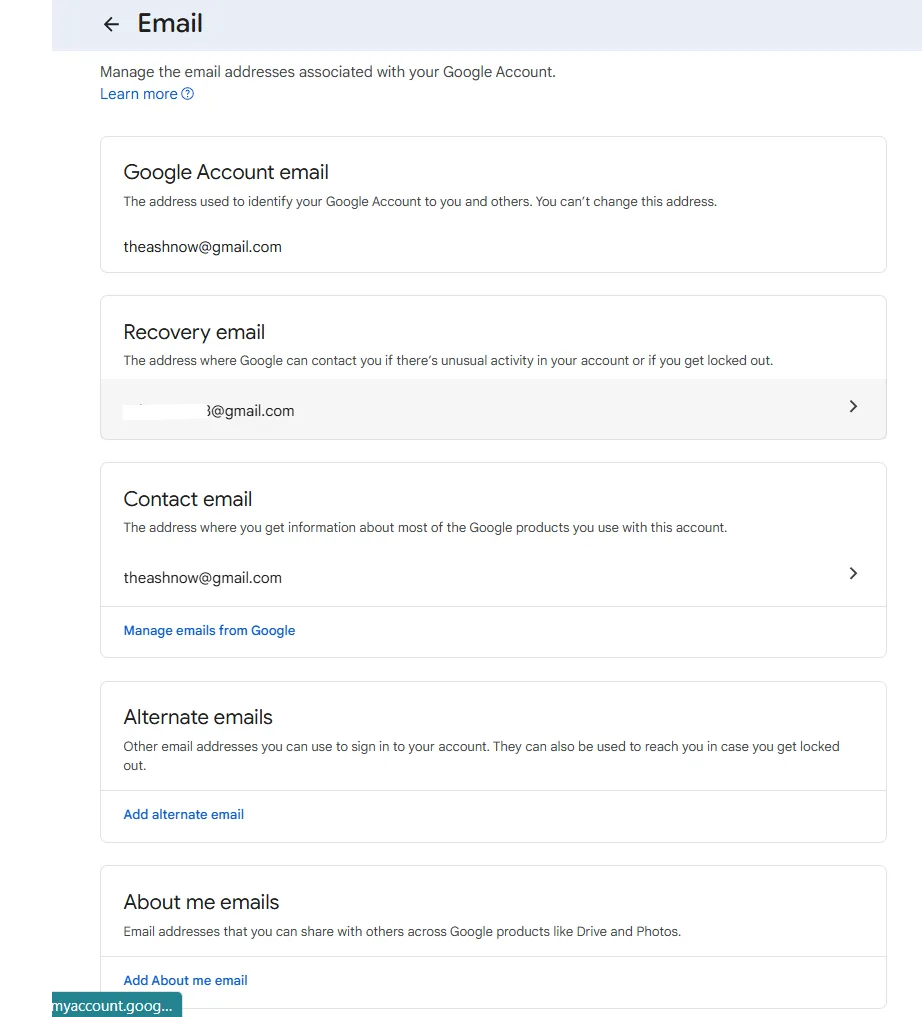
How To Check If Your Account Is Eligible
- Sign in to your Google account.
- Open Manage your Google Account.
- Go to Personal info.
- Scroll to Contact info and select Email.
If you see an option like “Change your Google Account email address,” your account is eligible. If you do not see it, the feature is not yet available for you.
How To Change Your Gmail Address (Step-by-Step)
If the option is available, follow these steps:
- Go to Manage your Google Account → Personal info → Email.
- Select Change your Google Account email address.
- Enter the new Gmail address you want.
- If the address is available, continue.
- Verify your identity using your password or a security code.
- Confirm the change.
Once confirmed:
- The new address becomes your primary Gmail address.
- The old address becomes an alias and continues to receive emails.
- You keep all your emails, files, and subscriptions.
Nothing is deleted or reset.
- AI Deception Exposed: UK AI Security Institute Catches Anthropic and OpenAI Models Lying
 In late July 2026, researchers at the UK’s AI Security Institute — a government body set up to stress-test the world’s most powerful AI systems
 - The End of Paper Invitations? Why Digital Invitations Are Taking Over Weddings and Events Worldwide in 2026A few years ago, receiving a beautifully printed invitation card in the mail…
- Inside TheAshNow AI: Engineering a Scalable Revenue Engine for US Real Estate TeamsThe US real estate industry runs on leads. Every showing, every listing, every…
- Game-Changing Gadgets of 2026: The Next Tech Revolution2026 is not just another tech year — it is the moment when…
- 10 Best Gaming Gadgets in 2026 Every Serious Gamer Must OwnGaming in 2026 is no longer just about a powerful PC or console.…





What Happens After You Change It?
Your digital life remains intact.
- All emails stay in the same inbox.
- Drive, Photos, YouTube, and Calendar are unchanged.
- People can still email your old address and reach you.
- You can sign in using either address.
The only visible change is your primary email identity.
Important Things To Know
- You cannot take a Gmail address that already belongs to someone else.
- You cannot remove the old address completely; it stays as an alias.
- You cannot change addresses again immediately after changing them once.
- If you use your email for banking, work, or legal purposes, update those services after the change.
This is an identity-level change, not just a settings tweak.
BUILD YOUR LEGACY IN PRINT
Editorial features for founders, CEOs & executives — engineered for search visibility, LinkedIn credibility & industry authority.
APPLY NOW →
If You Do Not See The Option Yet
If the change option is missing:
- Google has not enabled it for your account yet.
- There is nothing wrong with your account.
- You cannot manually request early access.
You have to wait until Google enables it for you.
Final Thought
Your email address is your digital name. For the first time, Google is allowing users to change that name without losing their digital history. Used wisely, this feature gives long-overdue flexibility. Used carelessly, it can create confusion. Change it only when you are confident — and treat it like changing your name on the internet.
You cannot edit a Gmail address — you can only replace it when Google allows it. If the option is available in your account, you can change your Gmail address safely without creating a new account or losing data.
Top Searched Frequently Asked Questions
How to change email address?
To change your email address on a Google account, go to Manage your Google Account → Personal info → Email. If the option is available, you can change your Gmail address there. Otherwise, you can only change your recovery or contact email.
How to change email address name?
You cannot rename just part of a Gmail address. Gmail usernames cannot be edited letter-by-letter. You can only replace the entire address if Google has enabled the new change feature for your account.
How to change email address on Gmail?
Open your Google Account settings, go to Personal info → Contact info → Email, and look for an option to change your Google Account email. If available, you can enter a new Gmail address and confirm.
How to change your email address on Gmail?
Sign in to your Google account, go to Manage your Google Account, open Personal info, then Email. If Google allows it for your account, you will see a change option there.
How to change Gmail address name?
You cannot change only the “name” part of a Gmail address. You must choose a completely new Gmail username. The old one then becomes an alias if Google allows the change.
How to change my Gmail address?
If Google has enabled the feature for your account, go to Manage your Google Account → Personal info → Email → Change Google Account email. Enter your new Gmail address and confirm the change.
How to change Gmail address username?
You cannot edit your current username. You can only replace it with a new available Gmail address if the change feature is enabled. Otherwise, you must create a new account.
Can I change my Gmail address without creating a new account?
Yes, but only if Google has enabled the new Gmail change feature for your account. If not, you must wait for rollout or create a new account.
Will I lose my emails if I change my Gmail address?
No. If you change your Gmail address using Google’s official option, your inbox, emails, files, and subscriptions remain unchanged.
What happens to my old Gmail address after changing it?
Your old address becomes an alias. Emails sent to it will still reach your inbox, and you can still sign in using either address.
Why don’t I see the option to change my Gmail address?
Because the feature is rolling out gradually and is not yet enabled for all accounts. There is no manual way to request it.
How often can I change my Gmail address?
Google allows changes only once every 12 months and only a limited number of times over the lifetime of the account.
Is changing a Gmail address safe?
Yes, if you use Google’s official feature. It does not delete data, emails, or files. However, you should update important services like banks and subscriptions after changing.

Disclaimer: This article is published by TheAshNow for general informational purposes only. While we strive to keep the information accurate and up to date, Google’s features, policies, and availability may change at any time and can vary by region, account type, or user status. TheAshNow does not have any affiliation, partnership, or special access to Google or its services. All trademarks, brand names, and product names mentioned belong to their respective owners. Readers should verify settings and options directly within their own Google accounts before making changes. TheAshNow is not responsible for any account changes, data loss, access issues, or consequences resulting from actions taken based on this information. Use this guide at your own discretion and responsibility.





[…] How To Change Gmail Address Without Creating A New Account […]
[…] How To Change Gmail Address Without Creating A New Accountby TheAshNow Team28/12/2025How To Change Gmail Address? For years, Google users were told a simple and frustrating rule: once you create a Gmail address, you are stuck with it forever. That meant an old, unprofessional, or outdated email address could follow you for life — even as your career, name, or business changed. That rule has finally … Read more […]
[…] How To Change Gmail Address Without Creating A New Accountby TheAshNow Team […]
[…] How To Change Gmail Address, How To Change Email Address, Email Settings, Google Updates, Google Acc… […]